You often hear the words “digital transformation” and “collaboration.” But what do they actually mean? What do they mean for the day-to-day of running your business?

Collaboration can’t happen without shared goals. When departments are siloed and unconnected, priorities can conflict. People are doing their best but may not be moving in the same direction.

Digital transformation is simply the use of technology to better reach business goals. This encompasses moving from analog ways of doing things. Transitioning to tools that are more automated and connected.

Microsoft has been at the forefront of digital transformation and collaboration. Its Viva platform drives an improved employee experience. It does this by use of AI, automation, cloud connectivity, and more.

In this article, you’ll get an overview of Microsoft Viva. Then, we’ll dive into one of the newest Viva offerings, Viva Goals. We’ll explore what it does and how it can help your company meet its targets.

What Is Microsoft Viva?

Microsoft Viva is a line of employee experience applications. These connect to the Microsoft 365 platform, and especially Microsoft Teams. The apps act as add-ons that can build on your organization’s digital capabilities.

There are currently seven apps within the Microsoft Viva line:

  • Viva Topics: Allows organizations to harness knowledge and experience. It serves up relevant topics from the company knowledge base from keywords.
  • Viva Connections: Gives employees a personalized and connected newsfeed. The company newsfeed serves up important news, conversations, and tools.
  • Viva Learning: Consolidates employee training apps. Makes it easy for employees to gain new skills from inside the MS Teams application.
  • Viva Insights: Improves employee well-being and corporate culture. Uses data-driven insights to provide productivity and well-being recommendations.
  • Viva Sales: Reduces the data input needed from salespeople. Serves up helpful lead interaction recommendations.
  • Viva Engage: Cultivates personal networks and community. Fosters engagement and knowledge sharing.
  • Viva Goals: Enables clarity and alignment of corporate goals.

The Viva line expands what businesses may traditionally see as “software.” It creates a connection between Microsoft Office and M365 apps. It also focuses on the people, rather than the tool. Microsoft designed Viva applications to use AI. This makes work easier and gives visibility into actionable data points.

What is Viva Goals?

Viva Goals is one of the newest Viva applications from Microsoft. It connects teams so they’re moving toward a shared set of goals. Employees align, whether someone works in the accounting department or customer support.

Business leaders can look at Viva Goals as a way to solidify company objectives. They can then tie these objectives to meaningful targets for each department.

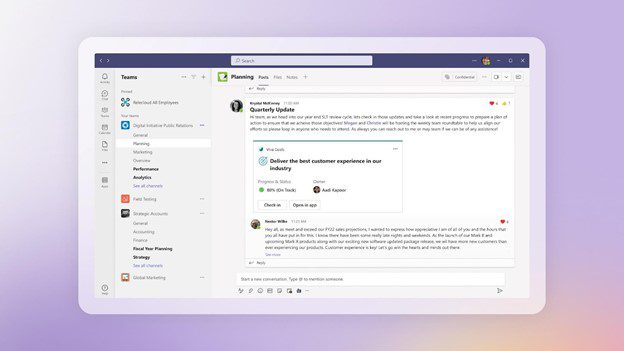
Viva Goals
Image from Microsoft

For example, say you have a corporate target to provide exceptional customer support. This goal by itself is generic. It doesn’t connect to what teams need to do to make it happen.

In Viva Goals, that target can have directives for various teams. Such as customer support reducing ticket resolution by 8 hours. This brings goals to a meaningful level and allows organizations to track progress.

Here are the key value-adds of using Viva Goals.

Aligns Your Team to the Same Goals

Viva Goals puts company goals and targets in a tangible form. There is a definition of success for teams and individuals. Work outcomes are directly connected to company-wide objectives.

Everyone is on the same page, rather than departments pursuing different targets. With alignment, companies can more easily reach their goals.

Maintains Focus on Goals

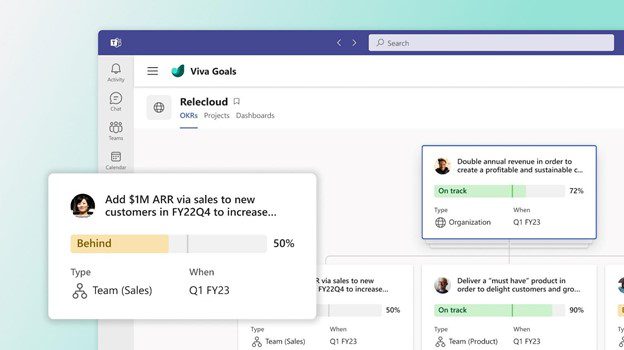
Viva connects to other M365 apps, making it easier to gather data insights. These insights help leaders more easily see goal progress.

Employees stay focused on goals. This is because goals connect to their daily work targets. Rather than being something they hear at a company event, goals get infused into the workflow.

Focus on Goals
Image from Microsoft

Integration with Teams & M365

The integration with Teams keeps goals front and center. Employees get recognized for meeting targets and helping the company achieve its goals. This keeps everyone engaged and moving together.

Progress towards goals isn’t kept on a spreadsheet on someone’s cloud drive. Instead, stats on goal achievement live in tools used daily. When goals remain visible, organizations have a better chance to achieve them.

How Do You Get Viva Goals?

If you want to subscribe to Viva Goals as an add-on to your M365 plan, it is currently $6.00/user/month.

For the entire suite of Viva applications, the current price is $9.00/user/month.

Questions About Microsoft 365 or Viva Goals?

Digital transformation with tools like Microsoft Viva is a necessity if you want to keep up. Old ways of doing things are giving way to the cloud, AI, and machine learning. We can help you navigate that territory. Give us a call and schedule a consultation to learn more.


Featured Image Credit

This Article has been Republished with Permission from .

Don’t Make Excuses! This is why Small UK Businesses Should Get Cyber Essentials Certified

As a small business owner in the UK, you’re probably aware of the increasing risk of cyber attacks. However, you may also have some concerns and objections about getting Cyber Essentials certified. It’s understandable that you may have some reservations, but it’s important to consider the many benefits that certification can bring to your business. In this blog post, we’ll counter some of the common excuses small UK businesses may have against getting Cyber Essentials certified, and highlight the benefits of doing so.

EXCUSE 1: “I don’t have the budget for it.”

One of the most common objections small businesses have about getting Cyber Essentials certified is that it’s expensive. However, this is not the case. The certification process is relatively affordable and cost-effective when compared to the potential cost of a cyber attack. In fact, according to the UK government’s Cyber Security Breaches Survey, the average cost of a cyber attack to a small business is £3,000. Implementing the controls outlined in the Cyber Essentials scheme can help to prevent such attacks, saving your business money in the long run.

EXCUSE 2: “I don’t have the time for it.”

Another common objection small businesses have is that the certification process is time-consuming. While it’s true that the process does require some effort, it’s not as onerous as you might think. A reputable and experienced provider like Equate Group can help you navigate the process of implementing Cyber Essentials, making it as smooth and efficient as possible. Furthermore, the certification process is a one-time effort that will provide ongoing protection for your business.

EXCUSE 3: “I don’t think my business is at risk.”

Some small business owners believe that their business is too small to be targeted by cybercriminals. However, this is not the case. Small businesses are a prime target for cyber attacks, as they often have fewer resources and less robust security systems in place than larger companies. Implementing the controls outlined in the Cyber Essentials scheme can help to protect your business from a wide range of common cyber threats, regardless of its size.

EXCUSE 4: “I don’t know where to start.”

Finally, some small business owners may feel overwhelmed by the prospect of getting Cyber Essentials certified, as they don’t know where to start. However, this doesn’t have to be the case. A reputable and experienced provider like Equate Group can help you navigate the process of implementing Cyber Essentials and achieving certification, from assessing your current security posture to providing ongoing support and maintenance.

Getting Cyber Essentials certified must be an essential step that any small business in the UK should take to protect themselves from cyber threats. The benefits of certification are numerous, including protecting against common cyber threats, demonstrating a commitment to cyber security, improving reputation, and increasing chances of winning contracts. With the help of a reputable and experienced provider like Equate Group, small businesses can navigate the process of implementing Cyber Essentials with ease, and achieve certification that will provide ongoing protection for their business.

10 reasons why all UK SMBs should be Cyber Essentials certified.

Small businesses in the UK are facing an increased risk of falling victim to cyber-attacks. As a result, it’s more important than ever for small businesses to take cybersecurity seriously. One effective solution is the UK government-backed scheme, Cyber Essentials. It is designed to be easy to implement and provides a set of basic but essential controls to help small businesses protect themselves against common cyber threats. By getting Cyber Essentials certified, small businesses can significantly reduce their risk of falling victim to cyber-attacks, and also gain other benefits that can help with the growth and continuity of their business.

Here are ten reasons why your UK business should get Cyber Essentials certified:

  1. Protects against common cyber threats: As the name suggests, Cyber Essentials provide a set of basic but essential controls that help protect against common cyber threats. This includes security measures for firewalls, internet gateways, access control, malware protection, and patch management.
  2. Cost-effective solution: Implementing cyber essentials is a cost-effective solution for small businesses to reduce their risk of falling victim to cyber-attacks significantly.
  3. Demonstrates commitment to cybersecurity: By getting cyber essentials certified, businesses can demonstrate to their customers, partners, and suppliers that they take cybersecurity seriously.
  4. Increases chances of winning contracts: Many large companies now require their suppliers to be cyber essentials certified, so having cyber essentials certification can increase a business’s chances of being selected as a supplier.
  5. Improves reputation: Cyber essentials certification can improve a business’s reputation by showing that they are committed to protecting its customers’ data and information.
  6. Provides peace of mind: Cyber Essentials can provide peace of mind for business owners, knowing they have taken steps to protect themselves from cyber threats.
  7. Provides a competitive edge: By being cyber essentials certified, a business can gain a competitive edge in the marketplace by showing that they take cybersecurity seriously.
  8. Increases credibility: Cyber Essentials certification demonstrates to customers, partners, and suppliers that a business is credible and trustworthy.
  9. Meets regulatory requirements: Cyber Essentials certification can help businesses meet regulatory requirements, such as the General Data Protection Regulation (GDPR).
  10. Easily Implemented: Cyber Essentials are easy to implement, so small businesses can quickly and efficiently take steps to protect themselves from cyber threats.

In conclusion, implementing cyber essentials is a vital step that small businesses in the UK should take to protect themselves from cyber threats. The benefits of getting cyber essentials certified are numerous, including protecting against common cyber threats, demonstrating a commitment to cyber security, improving reputation, increasing chances of winning contracts and being easily implementable.

Achieving cyber essentials certification can be challenging for small businesses due to their limited resources and expertise. However, with the help of a reputable and experienced provider like Equate Group, small businesses can easily navigate the process of implementing cyber essentials.

Equate Group’s team of experts can help with everything from assessing a business’s current security posture to implementing the necessary controls and achieving certification.

If you are a small business owner looking to protect your business from cyber threats and gain a competitive edge in the marketplace, don’t hesitate to contact Equate Group to help achieve cyber essentials certification.

The Importance of Cyber Essentials for Small Businesses: A Look at the Statistics
loudspeaker icon

Cybersecurity is a critical concern for small businesses in the United Kingdom. With over 5.7 million small and medium-sized enterprises (SMEs) operating in the country, these businesses play a vital role in the economy. Unfortunately, small businesses are at a higher risk of falling victim to cyber-attacks. In fact, according to the UK government’s Cyber Security Breaches Survey, an alarming 43% of cyber-attacks target small businesses.

One of the reasons for this increased risk is that small businesses often need more resources and more robust security systems compared to larger companies. This makes them an attractive target for cybercriminals, who can exploit vulnerabilities in their systems to gain access to sensitive data or disrupt operations. The solution to this problem is cyber essential. This UK government-backed scheme provides a set of basic but essential controls to help small businesses protect themselves against common cyber threats.

The National Cyber Security Centre (NCSC) oversees the implementation of cyber essentials, which covers five key areas: boundary firewalls and internet gateways, secure configuration, access control, malware protection, and patch management. By implementing cyber essentials, small businesses can significantly reduce their risk of falling victim to cyber-attacks by up to 80%. Additionally, compliance with cyber essentials can provide small businesses with a competitive edge in the marketplace, as many large companies now require their suppliers to be Cyber Essentials certified as a minimum requirement for doing business with them.

Cyber essentials certification is crucial not only for the protection of small businesses but also the growth and continuity of their business. By implementing cyber essentials, small businesses can demonstrate that they take cyber security seriously, which is essential in today’s digital age.

In addition to protecting small businesses from cyber threats, cyber essentials can also have other benefits. For example, by implementing cyber essentials, small businesses can increase their chances of being selected as suppliers for larger companies.

It’s more important than ever for small businesses in the UK to take cybersecurity seriously. The cyber threat landscape is constantly evolving, and small businesses need to stay ahead of the curve by implementing cyber essentials. By taking this crucial step, small businesses can secure the growth and continuity of their business, as well as protect themselves from common cyber threats.

The global pandemic put a big emphasis on the need to run a business from anywhere. Enabling employees to work remotely requires cloud solutions. This includes collaborative platforms like Google Workspace and Microsoft 365. VoIP (Voice over Internet Protocol) phone systems have also become critical.

VoIP allows companies to stay in contact with customers and potential customers. Employees can work from anywhere and still answer the business phone line. Callers get a similar experience no matter where employees may be working, office, or home.

When you have people working from home, those old landline systems are inefficient. This has led to a large movement by businesses to VoIP. Both for necessity and cost-savings.

According to Microsoft, 82% of organizations have reported saving money after implementing VoIP.

While VoIP is the way to go for the future, this doesn’t mean it’s foolproof. Companies that don’t set up their system efficiently, can experience issues. This includes things like dropped calls, low bandwidth, and features left unused.

If you’ve been struggling to make your cloud phone system more efficient, check out these tips below. They provide setup best practices for VoIP. Use these to positively impact your bottom line.

1. Check Network Capabilities

You can’t just assume that you can enable a VoIP system, and all will be well. Your network may not be able to handle the extra bandwidth needs without adjustments.

Things you want to look at include jitter and packet loss. Additionally, review router settings to make sure it can handle peak traffic times. Experiencing dropped calls or choppy audio shows a need to address issues. These may include adjusting network hardware and/or increasing your ISP bandwidth.

2. Prioritize Your VoIP Software Using QoS Rules

Quality of Service (QoS) is a router settings area that allows you to say which traffic is most important. If QoS is not in place, it means resource issues. A large cloud backup could kick in and interrupt your calls because it’s taking up bandwidth.

QoS sets up “traffic lanes” that give priority to certain functions. You’ll want to have your VoIP software prioritized to get the bandwidth it needs. This avoids issues with less critical processes hogging up internet resources.

Using QoS keeps your calls smooth. It also improves the reliability of your cloud phone system. It’s also a good idea to use these rules for other important cloud activities.

3. Provide Quality Headsets for Your Team

A cheap headset can ruin the call experience for a potential customer. If someone calls in and can’t hear anything or gets choppy reception, they’ll quickly get frustrated. They will most likely figure that your company doesn’t have its act together.

Your employees may not be able to afford high-quality headsets. They also may not know what type to buy. Head off potential problems by issuing quality headsets for your team to use.

4. Set Up Departments & Ring Groups

One of the great features of VoIP phone systems is the ability to set up ring groups. You first set up your department groups (accounting, marketing, etc.). Then set the included employee extensions.

Creating a ring group allows you to have a call go to your customer support department as a whole. This is better than one person, who may be busy. That way, the whole group gets the ring, and the first available person can pick up.

Ring groups improve the caller experience by reducing the wait time. It can also mitigate the need for the caller to leave a voicemail and get stuck waiting on a callback.

5. Create Your Company Directory

Auto assistants are extremely helpful and nearly all VoIP systems have them. First, you set up your company directory and then record messages to prompt the caller.

For example, you can set up a message that prompts them to input the last name of the person they are trying to reach. If they aren’t calling a specific person, they can be routed to a department.

While setting up a company directory takes a little effort upfront, it will save much more. You no longer will need to have someone specifically routing every call. Callers can also get to the person or department they need faster. This improves the customer experience and boosts office productivity.

6. Have Employees Set Up Their Voicemail & VM to Email

When you get out of a long meeting, going through a bunch of voicemails can take time. Instead of having to listen to each one to see which calls are a priority, you could simply read through them.

The voicemail to email feature in VoIP phone systems will automatically transcribe voicemails. They are then emailed to the recipient. This improves efficiency. It also eliminates wasted time having to listen to entire messages to know who called.

Have employees set up this feature with their extension and email address. Some VoIP systems also offer an option to have transcribed voicemails sent via SMS.

7. Train Your Team on the Call Handling Process

Don’t leave your employees to jump in and learn a VoIP system themselves. It’s important to train them on the features and the company calling process. This ensures that your team can enjoy all those time-saving features.

Get Help Enhancing Your Business Phone System

Need help improving your business phone system? Looking for a better customer experience? Give us a call and schedule a consultation. We can help!


Featured Image Credit

This Article has been Republished with Permission from .

One constant struggle in offices is the balance between productivity and security. If you give users too much freedom in your network, risk increases. But add too many security gates, and productivity can dwindle.

It’s a fine balance between the two, but one you can achieve. Organizations need to recognize the importance of both. And not sacrifice one for another.

A recent report from Microsoft notes a dangerous lack of authentication security. Just 22% of Azure Active Directory users had multi-factor authentication (MFA) enabled. This means that over three-quarters were at a much higher risk of an account breach.

Why do organizations fail to adopt important security protocols, like MFA? We know that it’s as much as 99.9% effective at stopping fraudulent sign-ins. Yet so many companies aren’t adopting it.

User inconvenience is the biggest reason. MFA is not expensive. In fact, it’s free to enable in nearly all cloud applications. But if users say that it’s hurting productivity and is a pain to use, companies may not bother with it.

But sacrificing security can hurt productivity worse. Downtime due to a data breach is expensive and can put smaller companies out of business. The main cause of data breaches is credential compromise. So, if you’re not protecting your authentication process, the risk of becoming a breach victim is high.

35% of data breaches initiate from breached login credentials.

There are ways to have both secure and productive users. It simply takes adopting some solutions that can help. These are tools that improve authentication security. But do it in a way that keeps user convenience in mind.

Solutions to Improve Security Without Sacrificing Convenience

Use Contextual Authentication Rules

Not every user needs to go through the same authentication process. If someone is working in your building, they have a certain trust factor. If someone is attempting to log in from outside the country, they do not have that same trust.

Contextual authentication is used with MFA to target users that need to reach a higher bar. You may choose to limit or block system access to someone attempting to log in from a certain region. Or you may need to add an additional challenge question for users logging in after work hours.

Companies don’t need to inconvenience people working from normal locations during typical hours. But they can still verify those logging in under non-typical circumstances. Some of the contextual factors you can use include:

  • Time of day
  • Location
  • The device used
  • Time of the last login
  • Type of resources accessed

Install a Single Sign-on (SSO) Solution

A report on U.S. employees found they use a lot of apps. Workers switch between an average of 13 apps 30 times per day. That’s a lot of inconveniences if they need to use an MFA action for each of those logins.

Single sign-on applications solve this problem. They merge the authentication process for several apps into just one login. Employees log in once and can go through MFA a single time.

Using multi-factor authentication isn’t nearly as inconvenient. Users gain access to everything at the same time. SSO solutions help organizations improve their security without all the pushback from users.

Recognize Devices

Another way to better secure network access is to recognize devices. This is typically done using an endpoint device manager. This automates some of the security behind user authentication. Thus, it doesn’t inconvenience the person.

First, register employee devices in the endpoint device manager. Once completed, you can then set up security rules. Such as blocking unknown devices automatically.

You can also put in place device scanning for malware and automated updates. Both these things increase security without sacrificing productivity.

Use Role-based Authentication

Your shipping clerk may not have access to sensitive customer information. But your accounting team does. One can have a lower barrier to authentication.

Using role-based authentication saves time when setting up new employee accounts. Authentication and access happen based on the person’s role. Admins can program permissions and contextual authentication factors once. Then, the process automates as soon as an employee has their role set.

Consider Adding Biometrics

One of the most convenient forms of authentication is biometrics. This would be a fingerprint, retina, or facial scan. The user doesn’t need to type in anything. It also takes just a few seconds.

Biometric hardware can be costly, depending on the size of your organization. But you can introduce it over time. Perhaps using biometrics with your most sensitive roles first, then expanding.

Additionally, many apps are now incorporating things like facial scanning. Users can authenticate using a typical smartphone, making it much more affordable.

Need Help Improving Authentication Security?

Don’t give up important security because you’re afraid of user pushback. Give us a call and schedule a security consultation.


Featured Image Credit

This Article has been Republished with Permission from .

When the year is coming to a close, it’s the perfect time to plan for the future. Most businesses begin the year with the hope of growing and improving operations. Much of how a business operates depends on technology. So, it makes sense to look to your IT for areas of optimization.

A year-end technology review provides an opportunity to look at several areas of your IT. The goal is to take time to focus on improvements you can make to boost your bottom line. As well as what tactics to take to reduce the risk of a costly cyberattack.

A recent study by Deloitte looked at digitally advanced small businesses. Small businesses that make smart use of technology are well ahead of their peers. Here are some of the ways they excel:

  • Earn 2x more revenue per employee
  • Experience year-over-year revenue growth nearly 4x as high
  • Had an average employee growth rate over 6x as high

The bottom line is that companies that use technology well, do better. They are also more secure. According to IBM, businesses that have an incident response plan reduce the costs of a data breach by 61%. Using security AI and automation can lower costs by 70%.

This year-end, take some time to do a technology review with your IT team or managed IT provider. This will set you up for success and security in the coming year.

Considerations When Reviewing Your Technology at Year-End

The goal of a year-end technology review is to look at all areas of your IT infrastructure. Security, efficiency, and bottom-line considerations will be the key drivers for future initiatives.

Technology Policies

When technology policies get outdated, people stop following them. Review all your policies to see if any of them need updating to reflect new conditions. For example, if you now have some staff working from home, make sure your device use policy reflects this.

When you update policies, let your employees know. This gives them a refresher on important information. They may have forgotten certain things since onboarding.

Disaster Recovery Planning

When is the last time your company did an incident response drill? Is there a list of steps for employees to follow in the case of a natural disaster or cyberattack?

Take time to look at disaster recovery planning for the new year. You should also put dates in place for preparedness drills and training in the coming months.

IT Issues & Pain Points

You don’t want to go through a big IT upgrade without considering employee pain points. Otherwise, you might miss some golden opportunities to improve staff productivity and well-being.

Survey your employees on how they use technology. Ask questions about their favorite and least favorite apps. Ask what struggles they face. Let them tell you how they feel technology could improve to make their jobs better. This, in turn, benefits your business. It can also help you target the most impactful improvements.

Privileged Access & Orphaned Accounts

Do an audit of your privileged accounts as part of your year-end review. Over time, permissions can be misappropriated. This leaves your network at a higher risk of a major attack.

You should ensure that only those that need them have admin-level permissions. The fewer privileged accounts you have in your business tools, the lower your risk. Compromised privileged accounts password open the door to major damage.

While going through your accounts, also look for orphaned accounts. You need to close these because they’re no longer used. Leaving them active poses a security risk.

IT Upgrade & Transformation Plans for the New Year

If you make IT upgrades and decisions “on the fly” it can come back to bite you. It’s best to plan out a strategy ahead of time, so you can upgrade in an organized way.

Have a vulnerability assessment performed. This gives you a list of potential problems your company should address. Eliminating vulnerabilities improves your cybersecurity. Planning ahead allows you to budget for your upgrades and avoid unplanned expenses.

Cloud Use & Shadow IT

Review your use of cloud applications. Are certain apps hardly used? Do you have redundancies in your cloud environment? A review can help you cut waste and save money.

Also, look for uses of shadow IT by employees. These are cloud applications that are being used for work but did not go through approval. Management may not even be aware of them. Remove this security risk by either closing the accounts or officially approving them.

Customer-Facing Technology

Don’t forget to look at the customer experience of your technology infrastructure. Go through your website and contact process as a customer would.

If you get frustrated by things like site navigation, then your customers and leads may be too. Include optimizations to your customer-facing technology in your new year plans.

Schedule a Technology & Security Assessment Today!

We can help you with a thorough review of your technology environment to give you a roadmap for tomorrow. Contact us today for a free consultation.


Featured Image Credit

This Article has been Republished with Permission from .

It seems that nearly as long as passwords have been around, they’ve been a major source of security concern. Eighty-one percent of security incidents happen due to stolen or weak passwords. Additionally, employees continue to neglect the basics of good cyber hygiene.

For example, 61% of workers use the same password for multiple platforms. And 43% have shared their passwords with others. These factors are why compromised credentials are the main cause of data breaches.

Access and identity management have become a priority for many organizations. This is largely due to the rise of the cloud. As well as the practice of people needing to only enter a username and password to access systems.

Once a cybercriminal gets a hold of an employee’s login, they can access the account and any data that it contains. This is especially problematic when it’s an account like Microsoft 365 or Google Workspace. These accounts can access things like cloud storage and user email.

Below, we’ll explain what conditional access is. As well as how it works with multi-factor authentication (MFA). We’ll also review the advantages of moving to a conditional access process.

What Is Conditional Access?

Conditional access is also known as contextual access. It is a method of controlling user access. You can think of it as several “if/then” statements, meaning “if” this thing is present, “then” do this.

For example, conditional access allows you to set a rule that would state the following. “If a user is logging in from outside the country, require a one-time-passcode.”

Conditional access allows you to add many conditions to the process of user access to a system. It is typically used with MFA. This is to improve access security without unnecessarily inconveniencing users.

Some of the most common contextual factors used include:

  • IP address
  • Geographic location
  • Time of day
  • The device used
  • Role or group the user belongs to

Conditional access can be set up in Azure Active Directory. It can also be set up in another identity and access management tool. It’s helpful to get the assistance of your IT partner. We can help with setup and the conditions that would make the most sense for your business.

The Benefits of Implementing Conditional Access for Identity Management

Improves Security

Using conditional access improves security. It allows you more flexibility in challenging user legitimacy. It doesn’t just grant access to anyone with a username and password. Instead, the user needs to meet certain requirements.

Contextual access could block any login attempts from countries where no employees are. It could also present an extra verification question when employees use an unrecognized device.

Automates the Access Management Process

Once the if/then statements are set up, the system takes over. It automates the monitoring for contextual factors and takes the appropriate actions. This reduces the burden on administrative IT teams. It also ensures that no one is falling between the cracks.

Automated processes are more accurate and reliable than manual processes. Automation removes the human error component. This helps ensure that each condition is being verified for every single login.

Allows Restriction of Certain Activities

Conditional access isn’t only for keeping unauthorized users out of your accounts. You can use it in other ways. One of these is to restrict the activities that legitimate users can do.

For example, you could restrict access to data or settings based on a user’s role in the system. You can also use conditions in combination. Such as, lowering permissions to view-only. You could trigger this if a user holds a certain role and is logging in from an unknown device.

Improves the User Login Experience

Studies show that as many as 67% of businesses don’t use multi-factor authentication. This is despite the fact that it’s one of the most effective methods to stop credential breaches.

One of the biggest reasons it is not used is because of the inconvenience factor for employees. They may complain that it interferes with productivity. Or say that it makes it harder for them to use their business applications.

Using conditional access with MFA can improve the user experience. For example, you can require MFA only if users are off the premises. You can put in place extra challenge questions on a role or context-based basis. This keeps all users from being inconvenienced.

Enforces the Rule of Least Privilege

Using the rule of least privilege is a security best practice. It means only granting the lowest level of access in a system as necessary for a user to do their work. Once you have roles set up in your identity management system, you can base access on those roles.

Conditional access simplifies the process of restricting access to data or functions. You can base this on job needs. It streamlines identity management. This is because it contains all functions in the same system for access and MFA rules. Everything stays together, making management simpler.

Get Help Implementing Conditional Access Today!

Once conditional access is set up, the automated system takes over. It improves your security and reduces the risk of an account breach. Contact us today for a free consultation to enhance your cybersecurity.


Featured Image Credit

This Article has been Republished with Permission from .

Bring your own device (BYOD) is a concept that took hold after the invention of the smartphone. When phones got smarter, software developers began creating apps for those phones. Over time, mobile device use has overtaken desktop use at work.

According to Microsoft, mobile devices make up about 60% of the endpoints in a company network. They also handle about 80% of the workload. But they’re often neglected when it comes to strong cybersecurity measures.

This is especially true with employee-owned mobile devices. BYOD differs from corporate-owned mobile use programs. Instead of using company tools, employees are using their personal devices for work. Many businesses find this the most economical way to keep their teams productive.

Purchasing phones and wireless plans for staff is often out of reach financially. It can also be a pain for employees to carry around two different devices, personal and work.

It’s estimated that 83% of companies have some type of BYOD policy.

You can run BYOD securely if you have some best practices in place. Too often, business owners don’t even know all the devices that are connecting to business data. Or which ones may have data stored on them.

Here are some tips to overcome the security and challenges of BYOD. These should help you enjoy a win-win situation for employees and the business.

Define Your BYOD Policy

If there are no defined rules for BYOD, then you can’t expect the process to be secure. Employees may leave business data unprotected. Or they may connect to public Wi-Fi and then enter their business email password, exposing it.

If you allow employees to access business data from personal devices, you need a policy. This policy protects the company from unnecessary risk. It can also lay out specifics that reduce potential problems. For example, detailing the compensation for employees that use personal devices for work.

Keep Your Policy “Evergreen”

As soon as a policy gets outdated, it becomes less relevant to employees. Someone may look at your BYOD policy and note that one directive is old. Because of that, they may think they should ignore the entire policy.

Make sure that you keep your BYOD policy “evergreen.” This means updating it regularly if any changes impact those policies.

Use VoIP Apps for Business Calls

Before the pandemic, 65% of employees gave their personal phone numbers to customers. This often happens due to the need to connect with a client when away from an office phone. Clients also may save a personal number for a staff member. For example, when the employee calls the customer from their own device.

Customers having employees’ personal numbers is a problem for everyone. Employees may leave the company, and no longer answer those calls. The customer may not realize why.

You can avoid the issue by using a business VoIP phone system. These services have mobile apps that employees can use. VoIP mobile apps allow employees to make and receive calls through a business number.

Create Restrictions on Saved Company Data

Remote work has exasperated the security issue with BYOD. While BYOD may have meant mobile devices in the past, it now means computers too. Remote employees often will use their own PCs when working outside the office.

No matter what the type of device, you should maintain control of business data. It’s a good idea to restrict the types of data that staff can store on personal devices. You should also ensure that it’s backed up from those devices.

Require Device Updates

When employee devices are not updated or patched, they invite a data breach. Any endpoint connected to your network can enable a breach. This includes those owned by employees.

It can be tricky to ensure that a device owned by an employee is kept updated. Therefore, many businesses turn to endpoint management solutions. An endpoint device manager can push through automated updates. It also allows you to protect business data without intruding on employee privacy.

The monitoring and management capabilities of these tools improve security. This includes the ability to safelist devices. Safelisting can block devices not added to the endpoint manager.

Include BYOD in Your Offboarding Process

If an employee leaves your company, you need to clean their digital trail. Is the employee still receiving work email on their phone? Do they have access to company data through persistent logins? Are any saved company passwords on their device?

These are all questions to ask when offboarding a former staff member. You should also make sure to copy and remove any company files on their personal device. Additionally, ensure that you deauthorize their device(s) from your network.

Let Us Help You Explore Endpoint Security Solutions

We can help you explore solutions to secure a BYOD program. We’ll look at how your company uses personal devices at your business and recommend the best tools. Contact us today for a free consultation.


Featured Image Credit

This Article has been Republished with Permission from .
Microsoft Teams is a lot of things. It’s a video conferencing tool, a team messaging channel, and a tool for in-app co-authoring, just to name a few. During the pandemic, the popularity of Teams skyrocketed.

User numbers for MS Teams jumped from 20 million in November 2019 to 75 million in April 2020. As of this year, Microsoft reports a user count of 270 million for the platform. This makes it the most popular business tool for team communications.

But one of the things that makes the app popular is also one that can make the setup complex. Microsoft Teams has many moving parts, but to use them effectively they need to be well organized. Additionally, users need to have a chance to learn the system and train on best practices.

What Can Microsoft Teams Do?

First, let’s look at the different areas of Microsoft Teams and what it can do. Then, we’ll give you a simple setup checklist to help your team get up and running productively.

You can think of Teams as a virtual office in the cloud. It’s a centralized hub where teams can communicate, collaborate, and manage tasks. There is also an external communication component to Teams. You can use the app to video conference with anyone. You can also invite guests to a chat channel.

Here are some of the features of MS Teams:

  • Siloed chat channels
  • Security for team communications
  • Integration with Office apps
  • Integration with 3rd party apps
  • File sharing
  • Video and audio conferencing
  • VoIP phone system (with an extra add-on)
  • Keep all team resources in a single place
Microsoft Teams

Microsoft Teams Versions

Some good news for small businesses is that there is a free version of Microsoft Teams. If you sign up for a Microsoft 365 business plan, you get the app included, but with a few more features.

Microsoft has also been pushing MS Teams for personal use. So, you can use it to keep your departments better coordinated at work. Or to manage family video calls or PTA meeting collaboration. It’s a versatile and scalable virtual office platform.

Easy Checklist for Setting Up Microsoft Teams

1. Set Up Your Teams/Departments

One of the advantages of Teams is that it allows you to set up specific areas for your groups to collaborate. You do not want everyone to set these teams up on their own, or you could end up with an unorganized mess.

Some ideas for setting these up:

  • Set up teams by department (accounting, marketing, etc.)
  • Add a company-wide team (where everyone can collaborate)
  • Set up teams by role (office managers, executives, etc.)

Typically, if you mirror the hierarchy of your organization, that’s a good place to start. Team areas are secured so only those users invited can see or access any of the content in that team.

Set up Your Teams - Departments

2. Add Team Members

For each team, add the members allowed to take part in that team. These would be people that can see the resources posted in that team area. It would normally be the members of the department or group that the team is designed for.

3. Set Up Team Channels

The next level beneath the Team is the Channels. These team channels help organize conversations. For example, within a team set up for your marketing department, you may decide to add three channels. This keeps conversations more focused and makes it easier to find things.

For instance, you could have channels for:

  • Website Management
  • Social Media
  • Offline Advertising

Team channels are another area that you want to control. Don’t let everyone set up channels without a plan, otherwise, things get messy fast.

4. Set Up Team Tabs

Tabs are a great way to foster productivity. Say that employees on your accounting team need to access a tax reporting website. Inevitably, there can be time wasted asking for that link or a login. This is especially true if someone is filling in for a co-worker.

Team Tabs

You can add that website link and info to the Tabs area at the top of the team channels. Just click the plus sign to add a new resource and consolidate things for your team members.

5. Schedule MS Teams Training

One of the reasons that company initiatives fail is that users weren’t properly enabled. If users aren’t trained on using MS Teams, then they’ll revert to using whatever they used before. This negates the benefits of moving to Teams when not everyone is onboard.

Work with a Microsoft professional to train your teams. We can provide tips on the most productive features. As well as short-cut their learning curve quite a bit! Make sure to have a realistic timeframe. You should also survey users on whether they feel they need more training.

Need Some Help Implementing Teams in Your Organization?

We can help you over many of the roadblocks that organizations face when starting with Teams. Contact us today for a free consultation to enhance your collaboration and productivity.


Featured Image Credit

This Article has been Republished with Permission from .